
Important note: This checklist is general planning guidance, not legal, tax, fundraising, privacy, accessibility, SEO, or compliance advice. Analytics tools, consent requirements, provider settings, search reports, donation platforms, form tools, and privacy rules can change. Verify current details directly with official provider documentation and qualified help where legal, privacy, accessibility, or fundraising requirements may apply.
Website analytics can help a nonprofit see how recorded visits reach and use key pages. But analytics does not capture every visitor, explain every person’s intent, or prove that a donation, application, service request, or program outcome happened. Pageviews alone rarely answer whether a donation path, volunteer form, intake page, or contact flow is actually working.
This NPO Resources checklist helps small nonprofits create a simple website analytics review without building a dashboard nobody has time to use. Use it during a website setup, redesign, staff handoff, campaign review, or monthly check-in to connect website signals with real decisions, responsible data practices, and one clear next action.
For provider-level research inside this cluster, review resource pages for Google Analytics, Google Search Console, and Microsoft Clarity, plus connected website workflow tools such as WordPress, Webflow, Jotform, and Calendly. Verify current account ownership, data retention, consent controls, integration behavior, export options, and nonprofit fit directly with each provider.
Start with one decision, not a dashboard
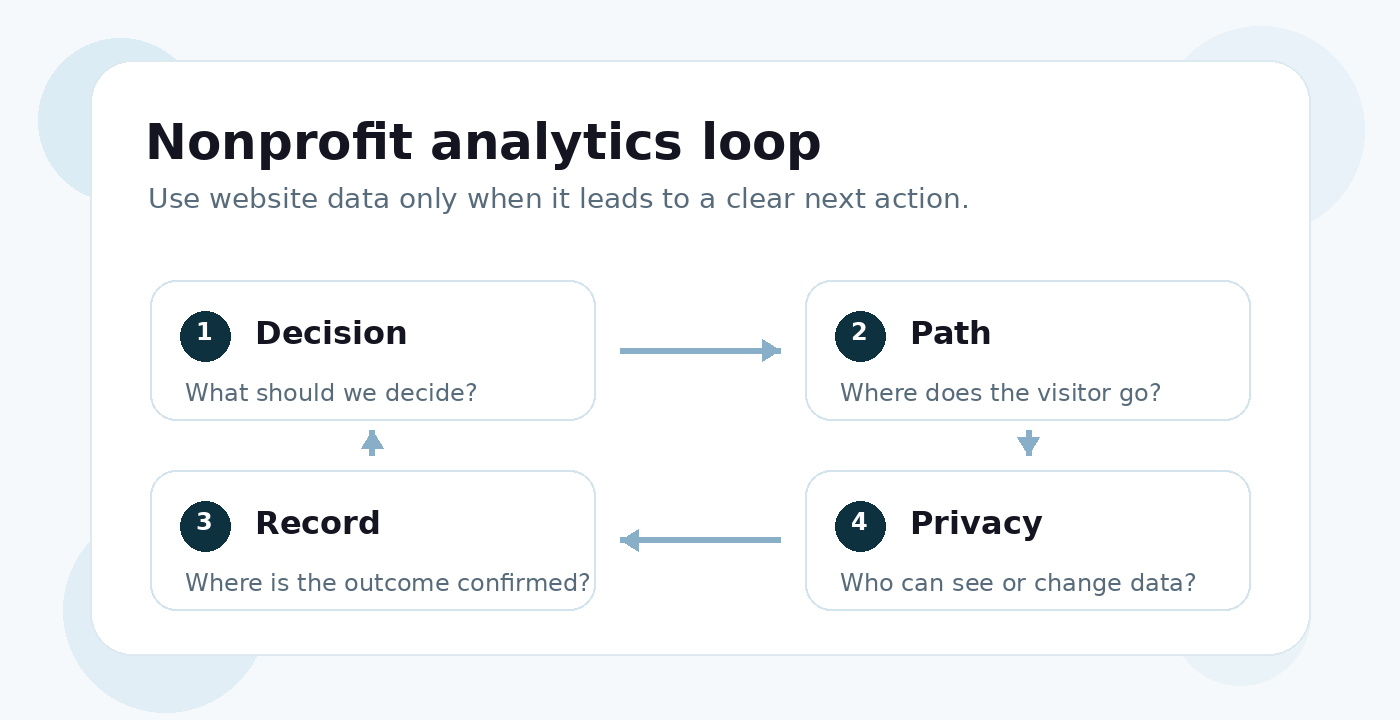
A nonprofit analytics review should begin with a decision the team can actually make. If nobody can act on a number, the report may create noise instead of clarity. Pick one question, one visitor path, and one owner before adding more charts.
Useful decision questions
- Can people find a priority program, service, or eligibility page?
- Can visitors complete the volunteer interest form without confusion?
- Does the donation path appear to lose people before the confirmation step?
- Are campaign links sending people to the correct landing page?
- Are recurring support questions a sign that a public page is missing or unclear?
- Does a key page need a staff owner because it has confirmed errors, confusing language, or a weak next step?
Do not treat more traffic as automatically better. A spike in demand may exceed program capacity, and a low-traffic page may still serve a small but important audience. The better first question is: “What decision will this data help us make?”
Create a minimal measurement plan
Before changing tracking settings, write a one-page plan. This does not need to be technical. It should define the action, the signal, the source of record, the owner, and the next decision.
Example 1
Is the volunteer form working?
Path: Volunteer page → form → confirmation
Signal: Form start and completion event, where configured
Source of record: Form tool or CRM record
Next action: Test the form and fix unclear steps.
Example 2
Are donation campaign links useful?
Path: Email or social link → donation page → confirmation
Signal: Campaign visits and donation-path steps, where reliable
Source of record: Donation platform or CRM
Next action: Compare visits with completed gifts and note limitations.
Example 3
Can people find program information?
Path: Search or menu → program page → contact or intake option
Signal: Page visits, search queries, and clicks to the next step
Source of record: Website analytics plus staff or user feedback
Next action: Clarify page language or navigation.
The source of record matters. Website analytics may show a click, visit, or event. The confirmed outcome may live in a donation platform, form tool, CRM, email system, event platform, or program record. Those systems may use different definitions, time zones, filters, attribution rules, and processing delays.
Confirm organizational ownership and access
Analytics accounts are easy to lose when a vendor, volunteer, founder, or staff member created them with a personal login. Before relying on reports, confirm that the organization has durable access and a handoff process.
- Identify the analytics property, search-platform property, tag manager, website plugin, form tool, donation platform, and CRM records involved.
- Confirm the primary owner and backup owner for each account.
- Use individual named accounts and appropriate roles where the provider supports them.
- Keep recovery methods and administrator access under organizational control.
- Enable multi-factor authentication where appropriate and supported.
- Document who can add tags, change events, edit consent settings, or connect third-party tools.
- Remove access after staff, volunteer, or vendor role changes.
- Do not share passwords, recovery codes, API keys, or private credentials through routine documentation.
For broader account continuity, use the Nonprofit Data Backup and Account Recovery Checklist alongside this analytics review.
Inventory what is actually being collected
Before adding more tracking, list what already loads on the website. A nonprofit may have analytics scripts, tag managers, embedded forms, donation widgets, chat tools, video embeds, heatmaps, advertising pixels, accessibility overlays, or CRM integrations. The public privacy language should match what the site actually does.
- Which analytics, form, donation, email, CRM, tag, and embedded-media vendors load on key pages?
- What data is collected, and why is it needed?
- Does the site send page URLs, search terms, form values, campaign parameters, or identifiers to third parties?
- Who can view reports and exported data?
- How long is user-level or event-level data retained?
- What deletion, redaction, or access controls are available?
- Does the actual site behavior match the privacy notice, cookie notice, and internal policy?
Do not assume that a cookie banner or consent mode setting solves privacy obligations by itself. Notice, consent, opt-out, script blocking, data retention, and vendor review depend on jurisdiction, audience, technology, configuration, and data use. Use qualified help where the organization is unsure.
Protect forms, donations, and sensitive paths
Some nonprofit website paths involve personal, donor, applicant, youth, health, housing, immigration, crisis, disability, financial, or other sensitive information. Analytics should usually measure that a step happened, not send the submitted contents to an analytics platform.
- Do not place names, email addresses, donor details, case information, or sensitive program data in event names, page URLs, search terms, campaign tags, or custom dimensions.
- For forms, distinguish form views, starts, submit attempts, validation success, and confirmed receipt.
- For donations, distinguish donation-page visits, button clicks, checkout starts, failed payments, refunds, and confirmed gifts where reliable data is available.
- For third-party donation or form domains, verify whether cross-domain measurement is supported and whether totals should be reconciled with the provider’s own records.
- Use invented or approved low-risk test data when testing tracking.
- Review consent and privacy behavior before adding more detailed tracking.
If your nonprofit is reviewing donation paths, pair this article with the Nonprofit Donation Page Checklist. If the path includes intake or service forms, also review the Nonprofit Online Form and Intake Workflow Checklist.
Validate tracking before interpreting reports
A chart can look precise even when the setup is incomplete. Before using analytics for decisions, test the path and compare the report against the system that actually receives the submission, gift, registration, or signup.
- Test each priority journey on mobile and desktop.
- Confirm the page, form, payment, or signup reaches the expected confirmation.
- Check that staff notifications or records arrive in the expected system.
- Look for duplicate tags or missing events where event tracking is used.
- Document event definitions and the source system for each number.
- Note consent choices, blockers, redirects, third-party domains, outages, campaign dates, redesigns, and tracking changes.
- Expect analytics, Search Console, donation platform, form tool, email, and CRM totals to differ unless definitions and conditions match closely.
A drop-off between steps is a place to investigate, not proof of why someone stopped. The issue could be unclear language, a broken form, mobile friction, accessibility barriers, payment failure, a confusing requirement, low trust, or a visitor choosing another channel.
Use search and campaign reports carefully
Search-platform tools and website analytics answer different questions. Search reports can help you see queries, pages, clicks, impressions, indexing issues, or page experience signals from a specific search platform. They are not a complete record of every search, every visitor, or every reason traffic changed.
- Review search queries and pages as directional signals, not a full keyword log.
- Use indexing or URL inspection reports when the question is whether important pages are discoverable by search engines.
- Do not assume a low click-through rate proves the title or page is bad; review the query, page, audience, and search context.
- Use consistent UTM campaign parameters for email, social, partner, QR code, or paid outreach links where useful.
- Keep campaign names simple and consistent across source, medium, and campaign fields.
- Never place supporter names, emails, client information, or sensitive details in campaign parameters.
- Remember that campaign visits do not prove donations, registrations, or program outcomes.
For broader website platform decisions, use the Nonprofit Website Platform Selection Checklist.
Review accessibility and user experience beyond analytics
Analytics can show that a page or step may need investigation. It cannot prove that a site is accessible, understandable, safe, or usable for every visitor. Priority paths should also be reviewed directly.
- Test priority pages with keyboard navigation and mobile zoom where practical.
- Review labels, instructions, error messages, focus behavior, contrast, and reflow.
- Check donation, intake, volunteer, and contact forms for clear next steps.
- Use applicable current accessibility guidance and qualified review where needed.
- Do not interpret a short session or incomplete form as lack of interest without checking barriers and alternative channels.
Run a simple monthly or campaign review
A useful review can be short. The goal is not to recite traffic numbers. The goal is to decide what the team should check, fix, test, or leave alone.
- Name the decision or campaign being reviewed.
- Confirm whether the website, tracking setup, consent behavior, forms, or donation flow changed.
- Check whether the priority path still works from the visitor’s point of view.
- Compare the website signal with the relevant source of record.
- Look for meaningful changes against the organization’s own relevant baseline, not generic benchmarks.
- Add context from staff observations, support questions, user feedback, form records, donor records, or program data.
- Record one action, one owner, and one follow-up date.
For board or funder reporting, define the metric, timeframe, source, and limitation. Avoid presenting website activity as mission impact. A campaign link visit is not a donation. A form event is not necessarily a completed service request. A traffic increase is not always a program success.
Implementation help
Need help turning analytics into a practical nonprofit workflow?
If your organization needs help connecting website analytics with donation paths, forms, reports, or staff follow-up, connectNPO can help review the workflow and identify practical next steps.
A one-page analytics checklist
- One priority decision or question is written down.
- The visitor path connected to that decision is identified.
- The website signal and source of record are both named.
- Analytics, search-platform, form, donation, email, and CRM access are owned by current authorized people.
- Data collection, privacy notice, consent, retention, vendor, and access settings are reviewed where applicable.
- Forms and donation paths are tested with low-risk test data.
- Submitted values, payment details, direct identifiers, and sensitive program information are not intentionally sent to analytics tools.
- Event definitions are documented before reports are interpreted.
- Campaign links use consistent, non-sensitive naming where useful.
- Priority pages are checked for mobile usability and accessibility barriers beyond analytics.
- Monthly or campaign reports include definitions, source, timeframe, limitations, and one next action.
- Account access and recovery are reviewed before staff or vendor transitions.
Related website and digital resources
Use these related NPO Resources pages when analytics review turns into a more specific platform, form intake, donation, email campaign, account ownership, or provider research question.
- Website and Digital Tools for Nonprofits — review the broader website and digital tool landscape.
- Website Analytics Tools for Nonprofits — compare analytics and behavior tools listed in NPO Resources.
- Nonprofit Website Platform Selection Checklist — review website ownership, platform control, handoff, accessibility, and migration questions.
- Nonprofit Online Form and Intake Workflow Checklist — review form ownership, routing, confirmation, privacy, and handoff practices.
- Online Form and Scheduling Tools for Nonprofits — compare form and scheduling tools used for visitor action workflows.
- Nonprofit Donation Page Checklist — review online giving flow, receipts, donor data, and launch testing.
- Nonprofit Email Newsletter Selection Checklist — review email campaign and list decisions that affect website traffic reports.
- Nonprofit Data Backup and Account Recovery Checklist — review account ownership, exports, and recovery paths before staff or vendor transitions.
Provider resource pages to review
These provider resource pages can help readers move from analytics checklist questions into concrete tool research. Inclusion here is not a ranking or endorsement.
Frequently asked questions
Start with one decision and one priority visitor journey, such as whether people can find program information, complete a volunteer form, or reach the donation confirmation step. Choose only the indicators needed to investigate that question, name the source of record, assign an owner, and decide what action the team could take.
Test the priority journey yourself, confirm that the real-world result occurred, and then check whether the intended measurement appeared where applicable. Retest after changes to the site, forms, consent setup, tags, plugins, donation platform, or payment flow.
Different systems may use different definitions, time zones, attribution rules, processing stages, filters, consent conditions, and duplicate-handling rules. Treat the transaction, form, program, or CRM system as the source of record where appropriate, and document known differences instead of forcing totals to match.
No. Track actions tied to a defined decision and only at a level the organization can manage responsibly. More events create more maintenance, interpretation, access, and privacy work. Sensitive or low-value tracking may create risk without improving the visitor experience.
Not by itself. Applicable obligations depend on factors such as jurisdiction, audience, technologies, configuration, vendors, and data use. Inventory what the site actually collects and shares, compare it with public disclosures, and obtain qualified guidance where needed.
No. Analytics may identify a page or step worth investigating, but it cannot establish accessibility or explain an individual visitor’s experience. Review priority journeys against applicable current accessibility guidance and include direct testing where feasible.
Use longer review periods where appropriate, avoid overinterpreting small changes, and limit detailed segmentation that could expose individuals. Combine aggregate patterns with form records, support questions, staff observations, and direct user feedback.
Assign a primary owner and a backup while keeping access and recovery under organizational control. Document what is measured, where reports live, who can view them, and how access will transfer after staff, volunteer, or vendor changes.