
Board consent forms, volunteer waivers, offer letters, grant agreements: someone on your team chases signatures every week. You may be weighing Docusign, the price looks steep, and some older pages still say to get it through TechSoup.
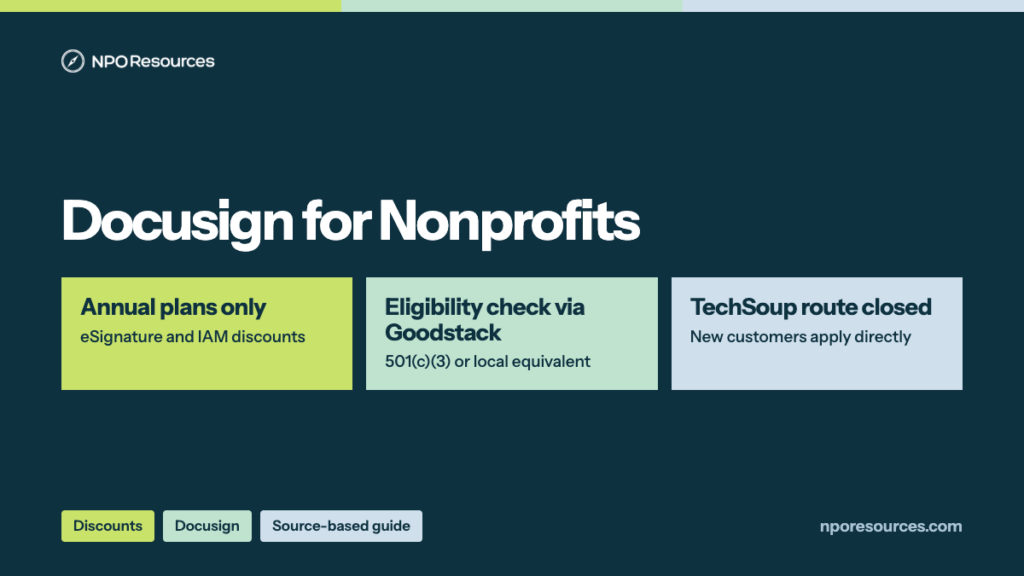
The short answer: yes. Docusign for Nonprofits takes 30% off eSignature Standard and Business Pro and 50% off IAM plans, on annual plans only. eSignature Standard costs $17.50 per user a month ($210 per user a year) instead of $25 (checked 9 November 2026). Goodstack verifies eligibility; TechSoup no longer offers Docusign.
The headline on Docusign’s pages says “up to 70%,” but the number that matters is the one against the annual price, and the discount works only when you buy a new plan the right way. This guide covers the prices, who qualifies, how to apply, what happens if you already use Docusign, and what changed for TechSoup customers, all from Docusign’s own pages (dates in the sources list).
Important note: General educational information, not legal, tax or purchasing advice. Docusign sets these prices and rules and changes them; confirm at checkout.
Key takeaways
- Docusign for Nonprofits takes 30% off eSignature Standard and Business Pro and 50% off IAM plans, on annual plans only (Docusign, 9 November 2026).
- That puts eSignature Standard at $17.50 per user a month ($210 a year) instead of $25. eSignature Personal, monthly plans and add-ons aren’t discounted.
- You need 501(c)(3) status (or your country’s equivalent) and Goodstack verification. Excluded types include advocacy, political, government, health care and education organizations, among others.
- The discount is currently for new customers. You pay the discounted price while Goodstack verifies; if verification fails, you pay full price for the rest of the term.
- Docusign stopped offering discounts through TechSoup in May 2025. TechSoup-bought eSignature Standard and Business Pro plans renew at their discount until canceled or changed.
Watch: the whole process in under two minutes
The price, who qualifies, the four steps, and what to do if you already use Docusign. English captions available.
Stuck on a step?
Free help from connectNPO, the team behind NPO Resources. No cost, no sales pitch. Tell us where you’re stuck and we’ll reply by email. Your organization applies itself; we never ask for passwords, bank details or your EIN.
On this page
- Docusign nonprofit pricing and cost
- What the discount doesn’t cover
- Who qualifies
- Which Docusign plan fits
- How to apply, step by step
- Already a Docusign customer?
- Bought Docusign through TechSoup?
- Sources reviewed
- Frequently asked questions
- Related NPO Resources guides
Docusign nonprofit pricing and cost
Docusign’s nonprofit FAQ lists “eSignature: 30% discount, annual plans only” and “IAM: 50% discount, annual plans only.” Here is what that looked like on its nonprofit eSignature pricing and nonprofit IAM pricing pages on 9 November 2026:
| Plan | Regular price, annual plan billed up front | Discount | Nonprofit price | Billed annually |
|---|---|---|---|---|
| eSignature Standard | $25 per user a month | 30% | $17.50 per user a month | $210 per user |
| eSignature Business Pro | $40 per user a month | 30% | $28 per user a month | $336 per user |
| IAM Starter | $40 per user a month | 50% | $20 per user a month | $240 per user |
| IAM Standard (3-user minimum) | $45 per user a month | 50% | $22.50 per user a month | $270 per user ($810 for 3 users) |
| IAM Professional (3-user minimum) | $75 per user a month | 50% | $37.50 per user a month | $450 per user ($1,350 for 3 users) |
| eSignature Personal (1 user) | $10 a month | None | No nonprofit discount | $120 |
Why the page says “up to 70%.” The nonprofit pages advertise “save up to 61%” on eSignature and “up to 70%” on IAM. Like a “sale” sticker measured from the highest price on the rack, in our reading those figures compare with paying month to month. By our arithmetic, $17.50 is about 61% below the $45 monthly price Docusign’s pricing guide lists for Standard, and IAM Standard’s $22.50 is 70% below the $75 month-to-month price the same guide lists for IAM Standard. Against the regular annual price, the discount is the FAQ’s 30% and 50%.
For a team. By our arithmetic, five people on eSignature Standard come to $1,050 a year at the nonprofit price, against $1,500 at the regular annual price.
Docusign’s regular eSignature pricing page also offers annual plans billed monthly, at $30 per user a month for Standard (an annual commitment of $360) and $45 for Business Pro ($540). Prices change; the checkout page shows the final amount.
What the Docusign nonprofit discount doesn’t cover
Envelopes. Each plan has a sending allowance: Personal sends 5 envelopes a month, Standard and Business Pro “100 envelopes per user per year,” IAM Starter 100 a user a year, and IAM Standard and Professional “Unlimited envelopes sent through web app.” Docusign’s pricing guide lists “10 per user each month” for the nonprofit Standard, Business Pro and IAM Starter plans, while the checkout pages say 100 a year, so confirm at checkout.
Who qualifies for the Docusign nonprofit discount
The 30-second check
- Is your organization a 501(c)(3) (or a recognized charity in your country)?
- Are you outside the excluded types below, such as advocacy, political, government, health care and education?
- Are you a new Docusign customer, buying an annual eSignature Standard, Business Pro or IAM plan?
Three yeses: you look eligible, and Goodstack makes the call. Unsure? Read the details below, or ask us for free help.
Docusign’s FAQ requires that you “Be recognized as a charitable or nonprofit organization by the local regulator in the country where you are registered (e.g., 501(c)3 in the US)” and complete verification through its partner Goodstack.
Eligible
- Public benefit nonprofits and NGOs
- 501(c)(3) organizations, or the local equivalent
- Fiscally sponsored organizations, if the sponsor also qualifies
Not eligible
- Legislation or advocacy, and political activity
- Governmental organizations
- Health care organizations and facilities
- Education, from preschool to universities and alumni groups
- Professional sports, financial services, business development
- Fraternities, sororities, and employee or membership benefit groups
- For-profit social enterprises, such as a Public Benefit Corporation or L3C
- Organizations in countries or regions under US (OFAC) sanctions
Fiscal sponsorship. Docusign accepts fiscally sponsored organizations that meet the criteria, with one condition: “The fiscal sponsor must also meet the current eligibility criteria.” Our Goodstack page explains how its verification works across programs.
Which Docusign plan fits your nonprofit
Because plan changes aren’t discounted for now, the plan is a bit like arranging heavy furniture: easier to get right before you move in. Here is what Docusign puts in each discounted plan, from its nonprofit pricing pages:
How to apply for Docusign for Nonprofits, step by step
These steps follow Docusign’s nonprofit FAQ, read on 9 November 2026. The forms sit behind Docusign’s checkout, so we describe them in words rather than show them.
1Check eligibility
Confirm your status and that your organization isn’t in an excluded category (see above). Our application checklist lists the records to have ready.
2Pick a plan on the nonprofit page
Choose an annual eSignature or IAM plan on Docusign’s nonprofit plans page, and decide the number of seats.
3Submit the application and pay
Enter payment and verification details. You get immediate access, and Docusign says “you will be charged the discounted price although the verification process is underway.” Think of a hotel check-in where you get the key first and the paperwork is confirmed after.
4Goodstack verifies
Goodstack sends an email confirmation “usually within a few hours, but some organizations may require a few days.” If it asks for documents, you must “submit all requested documents within 20 days from the application submission.”
5Keep the discount, or decide quickly
If you pass, you keep paying the discounted price, and “A successful verification is good for 5 years.” If you don’t pass, you’re “charged the full amount for the product(s) you purchased for the remaining subscription period,” with the option to cancel within the 30-day refund window or within 5 days of the result, whichever is later.
Already a Docusign customer?
Docusign’s FAQ is direct: “Currently, the nonprofit discount is limited to new eSignature or IAM customers.” If you already pay for Docusign, the route depends on how you bought it:
You bought a web plan by credit card. The FAQ says to contact Docusign Support to adjust your account if you’re eligible.
You work with a Docusign sales rep. Docusign says existing customers who want plan changes or the nonprofit discount should speak with their sales team about options.
You bought through TechSoup. See the next section.
Bought Docusign through TechSoup?
Docusign’s TechSoup transition article says it launched its global nonprofit program in April 2025, and “As of May 2025, we no longer offer product donations or discounts through TechSoup.” Older articles that still send you to TechSoup for Docusign describe a route that has closed. (For TechSoup’s own programs, see our TechSoup page.)
- eSignature Standard or Business Pro from TechSoup: the cost stays the same and the account renews at the current discounted rate until the plan is canceled or changed.
- Web plans, adding seats or upgrading online: the TechSoup discount isn’t applied to additional purchases, though Docusign says you may be eligible for its nonprofit discounts. (Enhanced plans can add seats at their current discount.)
- Enhanced plans from TechSoup: the discount holds for the rest of the contract term, and your Account Executive works with you at renewal to keep it, as long as you don’t decrease your seat or envelope volume.
- Unused TechSoup codes: Docusign says “Discount codes purchased through TechSoup before May 1, 2025, can be used within one year from the date of purchase.” By our arithmetic, those codes have all expired.
Docusign may also ask TechSoup customers to complete Goodstack verification at any point.
We recheck this page against the official sources. Last checked: 9 November 2026.
NPO Resources is run by connectNPO. This guide and the help offered here are free. We are not affiliated with Docusign or Goodstack, and we receive nothing when your organization buys Docusign.
Sources reviewed
We read the sources below on 9 November 2026 unless another date is shown. Prices and rules change; check the source before relying on any figure here.
- Docusign Support: Docusign for Nonprofits Support Page & FAQ (offer, eligibility, steps and terms; dated 4 June 2026), TechSoup Nonprofit Discount Program (TechSoup transition).
- Docusign pricing: nonprofit eSignature plans and IAM plans, regular eSignature pricing, and the Docusign Plans & Pricing (2026) guide (nonprofit prices as of October 2026).
- Docusign: Docusign for Nonprofits solutions page.
- Goodstack: Docusign for Nonprofits offer page.
Frequently asked questions
Yes. Docusign for Nonprofits takes 30% off eSignature Standard and Business Pro and 50% off IAM Starter, Standard and Professional, on annual plans only. Goodstack verifies eligibility, and the discount is currently for new customers.
On 9 November 2026, Docusign listed eSignature Standard at $17.50 per user a month ($210 a year) and Business Pro at $28 ($336 a year) for verified nonprofits, against regular annual (billed up front) prices of $25 and $40. IAM Starter was $20 per user a month.
No paid plan is free. Docusign offers nonprofit discounts; the lowest discounted plan, eSignature Standard, was $17.50 per user a month on 9 November 2026. Signing documents is free, and you can try Docusign eSignature free; when the trial ends you upgrade to a paid plan.
No. Docusign says that as of May 2025 it no longer offers product donations or discounts through TechSoup. eSignature Standard and Business Pro plans bought through TechSoup renew at their current discount until they are canceled or changed.
Not directly for now. Docusign says the discount is limited to new eSignature or IAM customers; existing customers should speak with their sales team, or contact Docusign Support if they bought a web plan by credit card.
Not against the regular annual price. Docusign’s FAQ lists 30% off eSignature and 50% off IAM on annual plans. The “up to 70%” on its nonprofit IAM page (61% on the eSignature page) matches, by our arithmetic, a comparison with month-to-month prices.
You’re charged the full price for the rest of the subscription period. Docusign lets you cancel within the 30-day refund window or within 5 days of the verification result, whichever is later.
Related NPO Resources guides
- Goodstack — how the verification partner works.
- Nonprofit discounts and tech access — compare discount programs side by side.
- Zoom for Nonprofits and Canva for Nonprofits — two more programs verified through Goodstack.
- Adobe for Nonprofits — Acrobat Pro and Creative Cloud.
- Google for Nonprofits and Microsoft 365 for Nonprofits — free email and office tools.
- Slack for Nonprofits and QuickBooks for Nonprofits — chat and accounting.
- Claude AI for Nonprofits and ChatGPT for Nonprofits — two AI discounts.
- Nonprofit tech discount application checklist — the records to gather before you apply.