
Important note: This article is general educational information, not legal, tax, or purchasing advice. Prices and eligibility rules are set by OpenAI and its verification partner, Goodstack, and they change. Confirm them on the official pages linked below before you rely on them.
Your staff may already be pasting grant drafts into ChatGPT on personal accounts, and someone has asked whether the organization should pay for it properly. Then you search for the nonprofit discount and find three different answers: 20% off, $8 a seat, and “up to 75%.” All three appeared on official OpenAI pages at some point, which is why the search is so confusing.
The short answer: ChatGPT for nonprofits comes through OpenAI for Nonprofits, which gives eligible nonprofits a lower price on ChatGPT Business, the team plan formerly called ChatGPT Team. When we checked OpenAI’s help article on 7 November 2026, Standard seats were $8 per user per month billed annually, or $10 per user per month billed monthly.
Premium seats get no discount, and larger organizations can ask OpenAI’s sales team about deeper discounts. You prove eligibility through Goodstack first, then buy Business with the same email address. This guide shows each screen, with screenshots, and the choices at checkout that decide what you actually pay.
Key takeaways
- The nonprofit price is on ChatGPT Business Standard seats: $8 per user per month billed annually, or $10 billed monthly, per OpenAI’s help article on 7 November 2026. The regular price is $20 or $25.
- The discount follows the seat, not the account. Premium seats stay at full price, even in a verified nonprofit’s workspace.
- There is no nonprofit price for ChatGPT Plus, Pro or Go, or for the API. Business usually needs at least 2 paid seats.
- Goodstack checks that your organization is eligible and that you belong to it. Apply with the email address you will use for ChatGPT Business.
- Already paying for Business? Use the same form with your account email. If approved, OpenAI applies a prorated discount to your current billing cycle.
Watch: the whole application in about two minutes
The prices, who qualifies, what to have ready, and all 8 steps on the real screens. English captions available.
Stuck on a step?
Free help from connectNPO, the team behind NPO Resources. No cost, no sales pitch. Tell us where you’re stuck and we’ll reply by email. Your organization applies itself; we never ask for passwords, bank details or your EIN.
On this page
- Who is eligible for the ChatGPT nonprofit discount
- ChatGPT for nonprofits: pricing
- What to have ready before you apply
- How to apply, step by step (with screenshots)
- Why applications stall, and how to fix them
- If you already pay for ChatGPT
- ChatGPT or Claude: the two nonprofit offers side by side
- After you’re approved
- Sources reviewed
- Frequently asked questions
- Related NPO Resources guides
Who is eligible for the ChatGPT nonprofit discount
The 30-second check
- Is your organization recognized by the IRS under section 501(c)(3)? Not sure? Look it up in the IRS Tax Exempt Organization Search.
- Do you want ChatGPT Business, the team plan? The discount isn’t offered on personal plans.
- Can you pay by credit or debit card? Self-serve Business doesn’t take invoices, ACH or purchase orders.
Three yeses: you can most likely apply today. A no, or a “not sure”: read the details below, or ask us.
OpenAI doesn’t run the eligibility check itself. Its help article says, “OpenAI partners with Goodstack to validate nonprofit eligibility criteria.” For the United States, Goodstack’s definition is an organization recognized as tax exempt by the IRS under section 501(c)(3), and “Group exempt organisations must supply their own EIN, and documentation showing their group exemption number to be eligible.” Goodstack also warns that “having nonprofit status doesn’t automatically grant eligibility,” because each software company can add its own rules.
Covered by the discount
- ChatGPT Business Standard seats, for verified nonprofits
- Larger deals on Business or Enterprise, through OpenAI’s sales team
- Nonprofits in other countries, checked against Goodstack’s definition for that country
Not covered
- ChatGPT Business Premium seats
- Personal plans: Free, Go, Plus and Pro
- The OpenAI API
- Organizations Goodstack can’t verify as nonprofits
Earlier versions of OpenAI’s help article, in January and May 2025, said “academic, medical, religious, or governmental institutions are not eligible for OpenAI for Nonprofits.” The current article no longer lists exclusions. If you run a school, a clinic or hospital, a congregation, or a public agency, don’t assume either way: apply, or ask Goodstack first.
When you look your organization up in the IRS Tax Exempt Organization Search, note the exact legal name, EIN, and city and state it shows; you will search for that name in Goodstack. If your exemption was automatically revoked for missing three years of annual filings, apply to the IRS for reinstatement first; our Form 990-N guide explains how that happens. If you are still waiting on a determination letter, the Form 1023 and 1023-EZ guide covers the application itself.
ChatGPT for nonprofits: pricing
ChatGPT Business is the self-serve team plan. Every Business workspace buys seats, and there are two kinds: Standard, for everyday work, and Premium, with higher usage limits. Here is what the official pages showed on 7 November 2026:
| Seat | Billed annually | Billed monthly | Where it’s stated |
|---|---|---|---|
| Standard seat, nonprofit price | $8 per user per month | $10 per user per month | OpenAI for Nonprofits |
| Standard seat, regular price | $20 per user per month | $25 per user per month | Business pricing |
| Premium seat (no nonprofit discount) | $100 per user per month | $125 per user per month | Business pricing |
| Larger deployments | Up to 75% off, through sales | OpenAI for Nonprofits, Business pricing | |
The 75% figure is described two ways. The help article ties it to ChatGPT Enterprise; OpenAI’s pricing pages say “up to a 75% discount on ChatGPT Business or ChatGPT Enterprise” through the sales team. If you are planning dozens of seats, ask sales which applies to you before buying self-serve.
Whichever plan, a Business workspace gives your team a shared space with admin controls for users, roles and access, centralized billing, and usage visibility, and OpenAI says it won’t train on your workspace’s data (Business overview). Those are the practical reasons to move staff off personal accounts.
The discount works like a grocery coupon that only covers certain items. Your organization is verified once, but at checkout the lower price lands only on Standard seats. OpenAI’s article is explicit: “If your workspace has both Standard and Premium seats, only the Standard seats receive the nonprofit discount.” So the price you pay is decided by two choices on the checkout screen, not by the approval email: which seat type, and annual or monthly.
Annual billing is the cheaper rate, like a yearly magazine subscription against buying each issue at the newsstand, but you commit for the year. OpenAI’s billing article says “added seats remain committed through the end of the current annual term,” and seat reductions take effect at the next billing cycle. If your team is still deciding whether it will use ChatGPT, monthly billing is the easier one to walk back.
Business usually needs at least two paid seats (OpenAI’s billing article says some new workspaces can start with one if checkout offers it), and the pricing page describes it as for teams of 2 to 200. Two Standard seats at the nonprofit price come to $16 a month billed annually ($192 a year), or $20 a month billed monthly, by our arithmetic. For comparison, one personal ChatGPT Plus subscription is $20 a month on OpenAI’s pricing page. Prices may vary by country and currency, and tax is added on top.
Why the conflicting numbers online? OpenAI’s May 2024 announcement offered 20% off, and the help article listed $20 and $24 a seat until at least December 2025. By May 2026 the help article showed $8 and $10. Guides quoting 20% are describing the older offer.
What to have ready before you apply
Gather these five things first. Ten minutes now beats an application that sits waiting.
1. Legal name and EIN
Exactly as the IRS lists them, plus your address. You use them to pick the right organization in step 3.
2. One email address
The one that will own the ChatGPT Business workspace. Goodstack accepts personal addresses, but a work address on your own domain speeds up confirming you belong to the organization. No domain email yet? See Google for Nonprofits or Microsoft for Nonprofits.
3. Your website
No website? Goodstack accepts a link to your main social media page or a site that mentions your organization’s name and mission.
4. An organization card
“ChatGPT Business supports credit and debit card payments.” Invoices, ACH, wire transfers and purchase orders aren’t available on self-serve Business (billing article).
5. Two PDFs, only if asked
If Goodstack asks for proof, its document rules say one organization document (bylaws, a conflict of interest policy or signed board minutes) and one bank statement speed up the review. U.S. groups are strongly encouraged to add an EIN Verification Letter. These go to Goodstack, never to us.
Goodstack’s rules for those PDFs: original versions with no redactions; dated more than 30 days ago; showing your legal name. The organization document must be signed, and the bank statement must be the original electronic PDF, not a scan. Goodstack says the EIN Verification Letter is “not to be confused with Determination Letter.” Our nonprofit tech discount application checklist covers the same records for other programs, so you only gather them once.
How to apply, step by step (with screenshots)
We went through OpenAI’s nonprofit application form on 7 November 2026 and captured each public screen. We didn’t submit anything, so screens after the contact details are described in words. Forms change; if yours looks different, the same information is usually being asked for.
1Open the short form from OpenAI’s help article
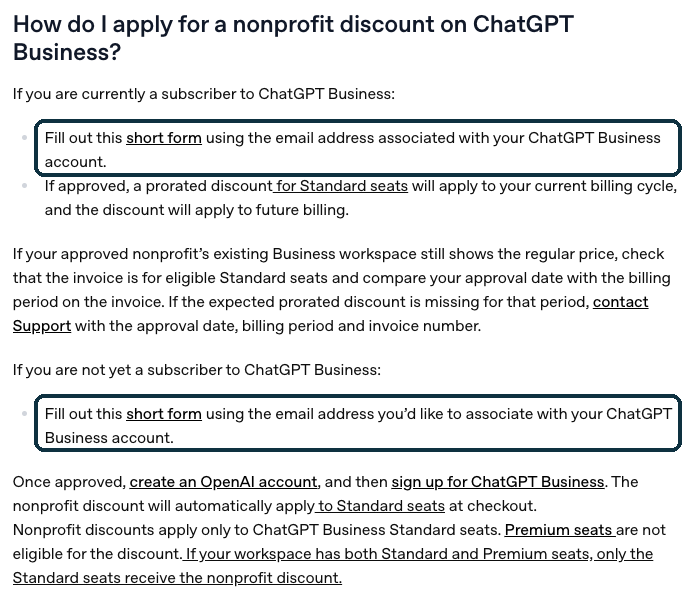
Go to OpenAI’s OpenAI for Nonprofits help article and click short form. There are two links: one for organizations that already pay for ChatGPT Business, and one for those that don’t yet. Both open the same form, OpenAI’s nonprofit application form, run by Goodstack.
2Pick your country
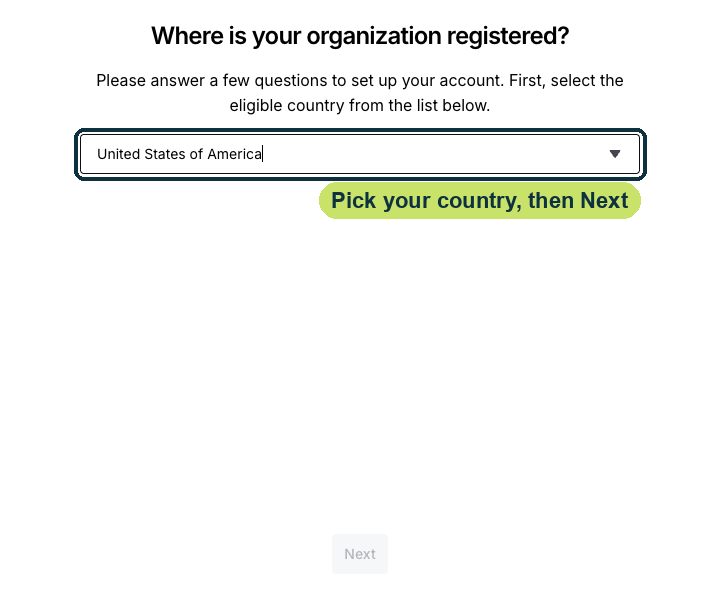
Choose United States of America and click Next.
3Search for your legal name
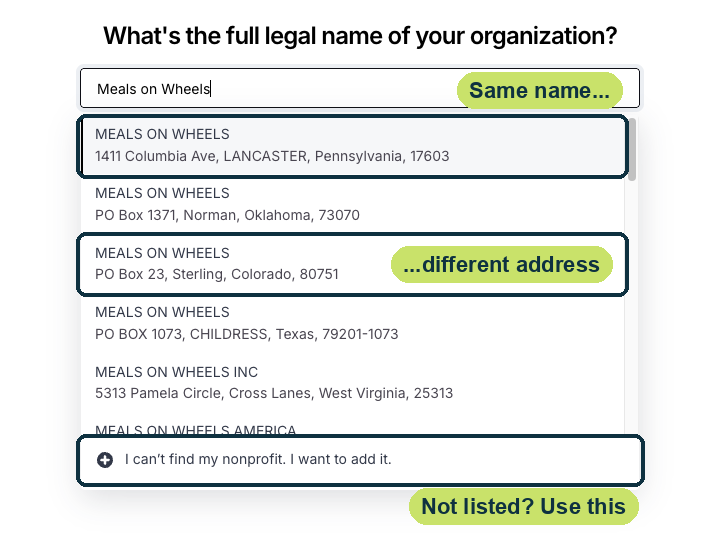
Type your name exactly as the IRS lists it. Read the address under each result: several organizations can share a name, so pick the one with your address. Not in the list? Click I can’t find my nonprofit. I want to add it. and follow the prompts to add it.
4Confirm your EIN and address
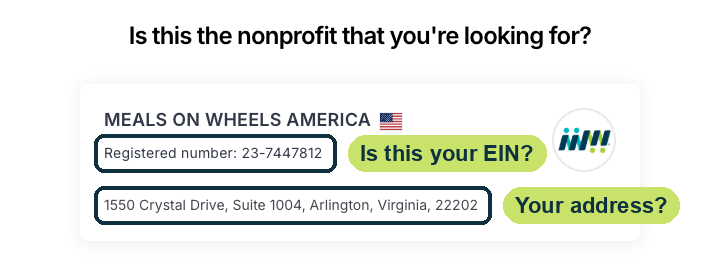
Goodstack shows the legal name, the registered number (your EIN) and the address. If any of them isn’t yours, use the back arrow and pick another result.
5Enter your own details
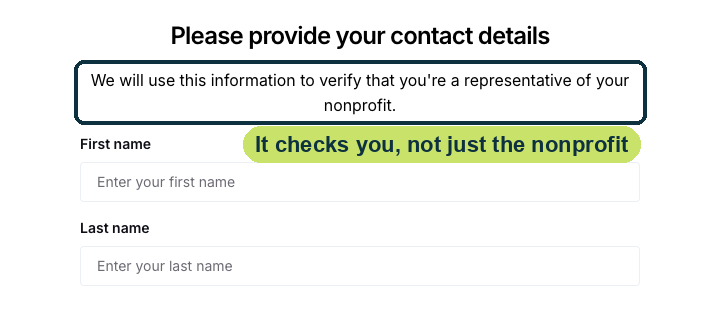
Goodstack asks who you are so it can confirm you represent the organization. When it asks for your email, use the address that will own the ChatGPT Business workspace. More questions follow this screen; we stopped here.
6Verify your email, then watch your inbox
Goodstack sends all updates to the address you applied with, so check spam and junk folders too. Goodstack says “We process applications within 72 hours, though often it is much quicker.” If it asks for documents, upload them within 30 days, or the application expires.
7Sign up for ChatGPT Business with the same email
Once approved, sign in to ChatGPT with the same email (or create an OpenAI account with it) and sign up for ChatGPT Business. Choose Standard seats (usually at least two), pick annual or monthly billing, then select continue to billing. OpenAI says the nonprofit discount appears there. Pay with the organization card. (Only approved organizations see the discounted checkout, so we can’t show it.)
8Invite your people
You become the workspace owner. Invite staff and assign seats. You are billed for every seat you buy, whether or not anyone is using it, and removing a member doesn’t reduce the seat count. Schedule a seat reduction if you no longer need one.
Why applications stall, and how to fix them
Proving your organization is a 501(c)(3) is usually the easy half; Goodstack can look that up. The half that more often sends an application to review is proving that you are connected to it. Goodstack says a review is often needed when it can’t confirm that link, or when your mission area is unclear. It’s like getting a library card: the library knows its own branch exists, but you still show something with your name on it.
Goodstack’s list of common rejection reasons reads the same way: alongside “unverified nonprofit status,” it lists “unconfirmed nonprofit association,” and an application expires if the email isn’t verified or requested documents aren’t uploaded within 30 days. Here are the stalls, with the fix for each:
For a review, Goodstack asks for as many of these as you can supply: a voided deposit slip or bank letter showing the organization’s name, governing documents stamped or signed by an official authority, and proof that you work there, such as a contract or ID card. These go to Goodstack, not to us. Questions about the verification go to Goodstack’s help center; billing questions after approval go to OpenAI support.
If you already pay for ChatGPT
Already on ChatGPT Business at full price. You don’t need to cancel. Fill out the same short form “using the email address associated with your ChatGPT Business account.” If approved, OpenAI says “a prorated discount for Standard seats will apply to your current billing cycle, and the discount will apply to future billing.”
Staff on personal Plus or Pro plans. Those plans have no nonprofit price. When someone joins your Business workspace they can keep their personal workspace separate, or merge it. OpenAI’s migration article says that when you merge, an active personal subscription is “automatically canceled and the unused portion is refunded, except for subscriptions purchased through a mobile app store.” Anyone who subscribed through the Apple App Store or Google Play should cancel there. If they keep the workspaces separate, the personal subscription keeps billing until they cancel it.
Sales tax. If your organization is exempt from sales tax in your state, OpenAI’s tax exemption article says to send your certificate through the chat bubble on its help pages, naming OpenAI OpCo, LLC as the seller where the form asks. Send your state’s exemption document: OpenAI says IRS determination letters (unless your state requires them) and W-9s are generally not accepted. The legal name on the certificate must match the name on your OpenAI account exactly. OpenAI can only process exemptions for accounts that have completed billing setup, and approved exemptions apply to future invoices; refunds of tax already charged are reviewed case by case and may be limited by timing. So send it as soon as your first payment goes through.
ChatGPT or Claude: the two nonprofit offers side by side
If you are comparing the two before paying for either: both use Goodstack, so the application is nearly identical; the differences are in what the discount covers. Our Claude for Nonprofits guide has the full details on Anthropic’s side.
| ChatGPT Business | Claude Team | |
|---|---|---|
| Nonprofit Standard seat | $8 billed annually, $10 billed monthly | $8 per user per month (billed monthly, per the June 2026 help article) |
| Premium seats | No nonprofit discount | $40 per user per month in Anthropic’s June 2026 help article |
| Seats | Usually 2 to 200 | 2 to 150 |
| Low- and middle-income countries | None published by OpenAI | $3 per user per month |
| Email rule | None stated by OpenAI; work email recommended by Goodstack | Organization domain required for the account creator (June 2026 help article) |
Claude figures are from our Claude guide, checked 5 November 2026; ChatGPT figures from OpenAI, checked 7 November 2026. Some organizations use both. If you do, apply through each company’s own Goodstack form.
After you’re approved
OpenAI’s help article says that with ChatGPT Business and Enterprise, “you own and control your data—we do not train on your data or conversations.” Your board may still want a short AI use policy before staff start uploading files. One limit to know: OpenAI says “We do not offer BAAs for ChatGPT Business.” If your organization handles health information that needs a Business Associate Agreement, talk to OpenAI’s sales team about Enterprise before anyone uploads client records.
Three ways to get value in the first week:
- Move the work staff already do. Ask each person to bring one task they were doing on a personal account, such as a grant draft or a donor thank-you, into the shared workspace, so it stops living on personal logins.
- Start with grant review. OpenAI’s nonprofit article suggests uploading a draft proposal with the funder’s criteria and asking ChatGPT to score the draft against each criterion and suggest fixes.
- Check your seat count after a month. You pay for every seat whether or not it is used, so trim unused seats before renewal.
OpenAI’s help article doesn’t say how long the discount lasts or whether it re-verifies organizations, so keep your 501(c)(3) status current and the Goodstack approval email on file. We recheck this page against the official sources. Last checked: 7 November 2026.
NPO Resources is run by connectNPO, a company that provides website and accounting services to nonprofits. This guide and the help offered here are free and separate from those services. We are not affiliated with OpenAI or Goodstack, and we receive nothing when your organization signs up.
Sources reviewed
We read every source below on 7 November 2026; some are dated earlier, as noted. Two-seat totals are our arithmetic. Prices and eligibility rules change; check the source before relying on any figure here.
- OpenAI help center: OpenAI for Nonprofits (price, Premium exclusion, Enterprise, how to apply, existing subscribers, BAA, data, API), ChatGPT Business overview (seat types, two-seat minimum, Team renamed Business on August 29, 2025), Sign up for ChatGPT Business, Managing billing and seats (card payments, seat billing), Workspace migration (personal subscriptions), U.S. sales tax exemption.
- OpenAI: Business pricing, ChatGPT pricing, Introducing OpenAI for Nonprofits (May 30, 2024, with a February 6, 2026 update).
- Archived versions of OpenAI’s nonprofit article: January 2025, May 2025, May 2026.
- Goodstack: Nonprofit definitions, eligibility, required documents, processing time, rejection reasons, requesting a review, personal email addresses, no website, adding an organization; Goodstack’s OpenAI application form (viewed 7 November 2026, nothing submitted).
- IRS: Tax Exempt Organization Search, Automatic revocation of exemption.
Frequently asked questions
OpenAI’s help article listed ChatGPT Business Standard seats at $8 per user per month billed annually, or $10 per user per month billed monthly, on 7 November 2026. Business usually needs at least 2 seats. Premium seats get no discount, and tax is extra.
No. Anyone can use the free ChatGPT plan, but there is no free nonprofit tier. The nonprofit program lowers the price of ChatGPT Business Standard seats and offers up to 75% off for larger deployments through OpenAI’s sales team.
No. The discount applies only to ChatGPT Business Standard seats and ChatGPT Enterprise, not to personal plans such as Plus, Pro or Go, and not to the API. Because Business usually needs only two seats, a small team can still use it.
OpenAI uses Goodstack to verify eligibility. In the U.S., Goodstack’s definition is an organization recognized by the IRS under section 501(c)(3); group-exempt chapters need their own EIN and proof of the group exemption. OpenAI’s current article doesn’t list excluded types, but earlier versions excluded academic, medical, religious and governmental institutions, so those organizations should ask Goodstack before applying.
Goodstack says it processes applications within 72 hours, often much faster. Updates go to the email address you applied with, so check spam. An application expires if the email isn’t verified, or requested documents aren’t uploaded, within 30 days.
Yes, without canceling. Fill out the same nonprofit form using the email address on your Business account. If approved, OpenAI applies a prorated discount for Standard seats to your current billing cycle and the discount to future billing.
Goodstack accepts personal email addresses, and OpenAI doesn’t state a domain rule. A work address on your organization’s domain speeds up the check that you belong to the organization, so use one if you have it, and use the same address for ChatGPT Business.
Related NPO Resources guides
- Claude AI for Nonprofits — Anthropic’s discount, also verified through Goodstack.
- Google Workspace for Nonprofits — Google’s no-cost edition for nonprofits, also verified through Goodstack.
- Microsoft 365 for Nonprofits — free Business Basic for up to 300 users, and how to register.
- Canva for Nonprofits — free Canva Pro for one team of up to 50, and how to apply.
- Zoom for Nonprofits — 50% off annual Pro and Business plans, and how to apply.
- Adobe for Nonprofits — free Express Premium, discounted Acrobat Pro and Creative Cloud, and where to apply.
- Slack for Nonprofits — free Pro for workspaces of up to 250 members, and how to apply.
- QuickBooks for Nonprofits — QuickBooks Online through TechSoup for a yearly admin fee, and how to set it up.
- Google for Nonprofits — one account for Workspace, Ad Grants and YouTube, and which login to use.
- Nonprofit tech discount application checklist — the records most discount programs ask for.
- Docusign for Nonprofits — 30% off annual eSignature plans, and how to apply.
- Nonprofit tech discounts — how to check other software programs at the source.
- Goodstack — the verification service used by OpenAI and other software companies.
- Form 990-N (e-Postcard) — the yearly filing that keeps small organizations from losing exemption.
- Form 1023 vs 1023-EZ — getting 501(c)(3) recognition if you don’t have it yet.